01EVERY PIXEL, CONSIDERED
A place for everything.
Halves, thirds, two-thirds, corners, and sixths. From a laptop to an ultrawide, make the most of the space you have.
 PaneShift.
Get PaneShift
PaneShift.
Get PaneShift
A little app for a beautifully arranged desktop.
Move, resize, and find your focus — all from your keyboard.
Good things happen when
everything finds its place.
Keyboard-first, always
Built for Windows
Ultrawide friendly
Quietly in your tray
01 / A BETTER ARRANGEMENT
Your desktop has potential.
Give every window a place,
and every task a little breathing room.
Halves, thirds, two-thirds, corners, and sixths. From a laptop to an ultrawide, make the most of the space you have.
Repeat a half shortcut to cycle through ½, ⅔, and ⅓. Thirds, two-thirds, and sixths cycle horizontally within the same row.
Choose the space between your windows and around the edges. Precise, adjustable gaps for a desktop that feels just right.
Multiple monitors, different resolutions, and per-monitor DPI support.
Lives in the tray. Pause, reload, or start at login. Optional update checks every 24 hours. Install when you choose.
MIT licensed. No telemetry in the app. Source code you can explore.
02 / MAKE IT YOURS
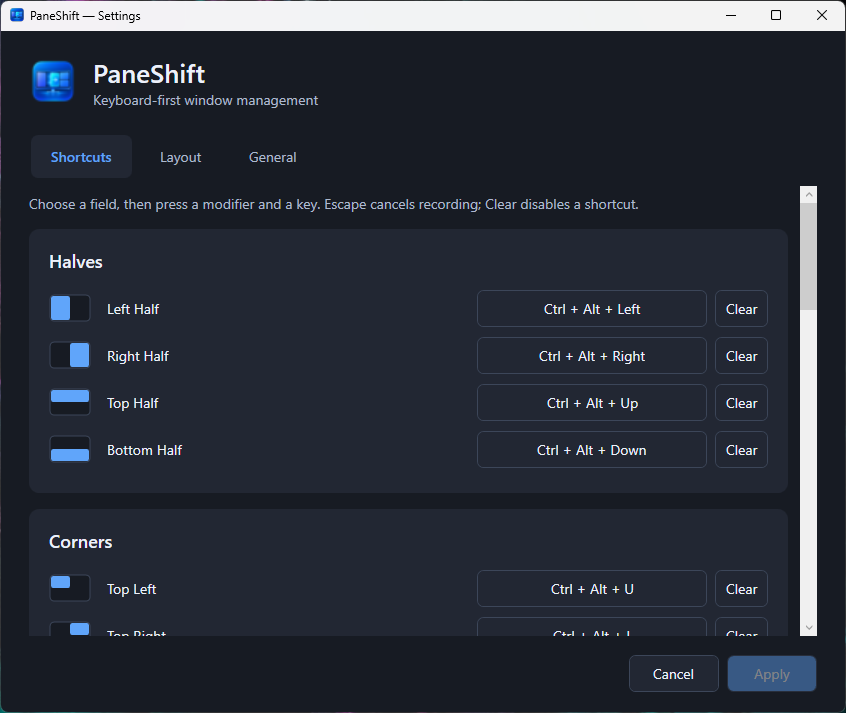
Native Windows settings.
Clear controls. A live spacing preview.
No configuration file required.
Prefer editing JSON? Make your changes,
then choose Reload Settings in the tray.
03 / MEET YOUR NEW MUSCLE MEMORY
Start with the defaults. Make them your own.
Your mouse can take a well-earned break.
FAMILIAR KEYS / OPTIONAL BY DESIGN
Optional Mac-style shortcuts for everyday apps.
Enable them in Settings → Keyboard and Apply.
Off by default, including when you upgrade.
New in 0.4.0: Swiss keyboard support.
Optionally type @ with Right Alt + G (AltGr), while other AltGr characters stay native. Enable it separately in Keyboard settings.
Also select all, undo, redo, save and find. Win+Q preserves normal save prompts and cleanup; it never forcibly terminates a process.
Replaces Windows shortcuts including Win+V, Win+A, Win+S and Win+W while enabled. Disable and Apply to restore them. Other Windows shortcuts stay native.
A LITTLE SHIFT GOES A LONG WAY.
Make yourself at home on your desktop.
PowerShellirm https://paneshift.ksmvc.ch/win | iex
The MSI installs for your user without an administrator prompt. Exit PaneShift from the tray before updating.
The PowerShell command verifies the release checksum and runs the installer. You can inspect the script before running it.
See the release notes, signing status, SHA-256 checksums, and available VirusTotal reports. Unsigned installers may show an unknown-publisher warning.
No. Both the installer and portable ZIP include the runtime. You just need Windows 11 x64. For the portable version, extract the entire ZIP before running PaneShift.App.exe.
PaneShift normally runs with standard privileges. To manage elevated windows, choose “Restart as administrator” from the tray or General settings and accept the Windows UAC prompt.
Your settings stay on your PC, in %LOCALAPPDATA%\PaneShift\settings.json. The installer and portable version share them. Uninstalling preserves this file; start at login needs a fresh opt-in after reinstalling.
Yes. In Settings → General → Updates, enable automatic checks and Apply, or use Check now. Automatic checks are off by default and run at most once every 24 hours. They contact GitHub without sending settings or keyboard activity. You choose when to download and install; installed copies use a verified MSI, while portable copies download a ZIP for manual extraction.
Exit PaneShift from the tray, then open the MSI. It migrates the previous default installation, keeps your settings and preserves your startup preference. If you installed the old EXE in a custom folder, uninstall that copy first. Your settings file is preserved.
Absolutely. Explore the source on GitHub, report an issue, suggest an improvement, or contribute code. PaneShift is an independent, MIT-licensed open-source project.